
coding-interview-university
A complete computer science study plan to become a software engineer.
361.7k
84.9k
0
361.7k
126
main
Coding Interview University
I originally created this as a short to-do list of study topics for becoming a software engineer,
but it grew to the large list you see today. After going through this study plan, [I got hired
as a Software Development Engineer at Amazon](https://startupnextdoor.com/ive-been-acquired-by-amazon/?src=ciu)!
You probably won't have to study as much as I did. Anyway, everything you need is here.
I studied about 8-12 hours a day, for several months. This is my story: Why I studied full-time for 8 months for a Google interview
Please Note: You won't need to study as much as I did. I wasted a lot of time on things I didn't need to know. More info about that is below. I'll help you get there without wasting your precious time.
The items listed here will prepare you well for a technical interview at just about any software company,
including the giants: Amazon, Facebook, Google, and Microsoft.
Best of luck to you!
<details> <summary>Translations:</summary>
- Bahasa Indonesia
- Bulgarian
- Español
- German
- Japanese (日本語)
- Marathi
- Polish
- Português Brasileiro
- Russian
- Tiếng Việt - Vietnamese
- Urdu - اردو
- Uzbek
- বাংলা - Bangla
- ខ្មែរ - Khmer
- 简体中文
- 繁體中文
</details>
<details> <summary>Translations in progress:</summary>
- Afrikaans
- Arabic
- French
- Greek
- Italian
- Korean(한국어)
- Malayalam
- Persian - Farsi
- Telugu
- Thai
- Turkish
- Українська
- עברית
- हिन्दी
</details>
What is it?

This is my multi-month study plan for becoming a software engineer for a large company.
Required:
- A little experience with coding (variables, loops, methods/functions, etc)
- Patience
- Time
Note this is a study plan for software engineering, not frontend engineering or full-stack development. There are really super roadmaps and coursework for those career paths elsewhere (see https://roadmap.sh/ for more info).
There is a lot to learn in a university Computer Science program, but only knowing about 75% is good enough for an interview, so that's what I cover here. For a complete CS self-taught program, the resources for my study plan have been included in Kamran Ahmed's Computer Science Roadmap: https://roadmap.sh/computer-science
---
Table of Contents
The Study Plan
- What is it?
- Why use it?
- How to use it
- Don't feel you aren't smart enough
- A Note About Video Resources
- Choose a Programming Language
- Books for Data Structures and Algorithms
- Interview Prep Books
- Don't Make My Mistakes
- What you Won't See Covered
- The Daily Plan
- Coding Question Practice
- Coding Problems
Topics of Study
- Algorithmic complexity / Big-O / Asymptotic analysis
- Data Structures
- Arrays
- Linked Lists
- Stack
- Queue
- Hash table
- More Knowledge
- Binary search
- Bitwise operations
- Trees
- Trees - Intro
- Binary search trees: BSTs
- Heap / Priority Queue / Binary Heap
- balanced search trees (general concept, not details)
- traversals: preorder, inorder, postorder, BFS, DFS
- Sorting
- selection
- insertion
- heapsort
- quicksort
- mergesort
- Graphs
- directed
- undirected
- adjacency matrix
- adjacency list
- traversals: BFS, DFS
- Even More Knowledge
- Recursion
- Dynamic Programming
- Design Patterns
- Combinatorics (n choose k) & Probability
- NP, NP-Complete and Approximation Algorithms
- How computers process a program
- Caches
- Processes and Threads
- Testing
- String searching & manipulations
- Tries
- Floating Point Numbers
- Unicode
- Endianness
- Networking
- Final Review
Getting the Job
- Update Your Resume
- Find a Job
- Interview Process & General Interview Prep
- Be thinking of for when the interview comes
- Have questions for the interviewer
- Once You've Got The Job
---------------- Everything below this point is optional ----------------
Optional Extra Topics & Resources
- Additional Books
- System Design, Scalability, Data Handling (if you have 4+ years experience)
- Additional Learning
- Compilers
- Emacs and vi(m)
- Unix command line tools
- Information theory
- Parity & Hamming Code
- Entropy
- Cryptography
- Compression
- Computer Security
- Garbage collection
- Parallel Programming
- Messaging, Serialization, and Queueing Systems
- A*
- Fast Fourier Transform
- Bloom Filter
- HyperLogLog
- Locality-Sensitive Hashing
- van Emde Boas Trees
- Augmented Data Structures
- Balanced search trees
- AVL trees
- Splay trees
- Red/black trees
- 2-3 search trees
- 2-3-4 Trees (aka 2-4 trees)
- N-ary (K-ary, M-ary) trees
- B-Trees
- k-D Trees
- Skip lists
- Network Flows
- Disjoint Sets & Union Find
- Math for Fast Processing
- Treap
- Linear Programming
- Geometry, Convex hull
- Discrete math
- Additional Detail on Some Subjects
- Video Series
- Computer Science Courses
- Papers
---
Why use it?
If you want to work as a software engineer for a large company, these are the things you have to know.
If you missed out on getting a degree in computer science, like I did, this will catch you up and save four years of your life.
When I started this project, I didn't know a stack from a heap, didn't know Big-O anything, or anything about trees, or how to traverse a graph. If I had to code a sorting algorithm, I can tell ya it would have been terrible. Every data structure I had ever used was built into the language, and I didn't know how they worked under the hood at all. I never had to manage memory unless a process I was running would give an "out of memory" error, and then I'd have to find a workaround. I used a few multidimensional arrays in my life and thousands of associative arrays, but I never created data structures from scratch.
It's a long plan. It may take you months. If you are familiar with a lot of this already it will take you a lot less time.
[⬆ back to top](#table-of-contents)
How to use it
Everything below is an outline, and you should tackle the items in order from top to bottom.
I'm using GitHub's special markdown flavor, including tasks lists to track progress.
If you don't want to use git
On this page, click the Code button near the top, then click "Download ZIP". Unzip the file and you can work with the text files.
If you're open in a code editor that understands markdown, you'll see everything formatted nicely.

If you're comfortable with git
Create a new branch so you can check items like this, just put an x in the brackets: [x]
- *Fork the GitHub repo:*
https://github.com/jwasham/coding-interview-universityby clicking on the Fork button.

- Clone to your local repo:
    git clone https://github.com/<YOUR_GITHUB_USERNAME>/coding-interview-university.git
    cd coding-interview-university
    git remote add upstream https://github.com/jwasham/coding-interview-university.git
git remote set-url --push upstream DISABLE # so that you don't push your personal progress back to the original repo- Mark all boxes with X after you completed your changes:
    git commit -am "Marked personal progress"
    git pull upstream main  # keep your fork up-to-date with changes from the original repo

    git push # just pushes to your fork
[⬆ back to top](#table-of-contents)
Don't feel you aren't smart enough
- Successful software engineers are smart, but many have an insecurity that they aren't smart enough.
- The following videos may help you overcome this insecurity:
- The myth of the Genius Programmer
- It's Dangerous to Go Alone: Battling the Invisible Monsters in Tech
[⬆ back to top](#table-of-contents)
A Note About Video Resources
Some videos are available only by enrolling in a Coursera or EdX class. These are called MOOCs. Sometimes the classes are not in session so you have to wait a couple of months, so you have no access.
It would be great to replace the online course resources with free and always-available public sources, such as YouTube videos (preferably university lectures), so that you people can study these anytime, not just when a specific online course is in session.
[⬆ back to top](#table-of-contents)
Choose a Programming Language
You'll need to choose a programming language for the coding interviews you do, but you'll also need to find a language that you can use to study computer science concepts.
Preferably the language would be the same, so that you only need to be proficient in one.
For this Study Plan
When I did the study plan, I used 2 languages for most of it: C and Python
- C: Very low level. Allows you to deal with pointers and memory allocation/deallocation, so you feel the data structures
and algorithms in your bones. In higher-level languages like Python or Java, these are hidden from you. In day-to-day work, that's terrific, but when you're learning how these low-level data structures are built, it's great to feel close to the metal.
- C is everywhere. You'll see examples in books, lectures, videos, everywhere while you're studying.
- The C Programming Language, 2nd Edition
- This is a short book, but it will give you a great handle on the C language and if you practice it a little
you'll quickly get proficient. Understanding C helps you understand how programs and memory work.
- You don't need to go super deep in the book (or even finish it). Just get to where you're comfortable reading and writing in C.
- Python: Modern and very expressive, I learned it because it's just super useful and also allows me to write less code in an interview.
This is my preference. You do what you like, of course.
You may not need it, but here are some sites for learning a new language:
For your Coding Interview
You can use a language you are comfortable in to do the coding part of the interview, but for large companies, these are solid choices:
- C++
- Java
- Python
You could also use these, but read around first. There may be caveats:
- JavaScript
- Ruby
Here is an article I wrote about choosing a language for the interview: Pick One Language for the Coding Interview. This is the original article my post was based on: Choosing a Programming Language for Interviews
You need to be very comfortable in the language and be knowledgeable.
Read more about choices:
See language-specific resources here
[⬆ back to top](#table-of-contents)
Books for Data Structures and Algorithms
This book will form your foundation for computer science.
Just choose one, in a language that you will be comfortable with. You'll be doing a lot of reading and coding.
Python
- Coding Interview Patterns: Nail Your Next Coding Interview (Main Recommendation)
- An insider’s perspective on what interviewers are truly looking for and why.
- 101 real coding interview problems with detailed solutions.
- Intuitive explanations that guide you through each problem as if you were solving it in a live interview.
- 1000+ diagrams to illustrate key concepts and patterns.
C
- Algorithms in C, Parts 1-5 (Bundle), 3rd Edition
- Fundamentals, Data Structures, Sorting, Searching, and Graph Algorithms
Java
Your choice:
- Goodrich, Tamassia, Goldwasser
- Data Structures and Algorithms in Java
- Sedgewick and Wayne:
- Algorithms
- Free Coursera course that covers the book (taught by the authors!):
- Algorithms I
- Algorithms II
C++
Your choice:
- Goodrich, Tamassia, and Mount
- Data Structures and Algorithms in C++, 2nd Edition
- Sedgewick and Wayne
- Algorithms in C++, Parts 1-4: Fundamentals, Data Structure, Sorting, Searching
- Algorithms in C++ Part 5: Graph Algorithms
[⬆ back to top](#table-of-contents)
Interview Prep Books
Here are some recommended books to supplement your learning.
- Programming Interviews Exposed: Coding Your Way Through the Interview, 4th Edition
- Answers in C++ and Java
- This is a good warm-up for Cracking the Coding Interview
- Not too difficult. Most problems may be easier than what you'll see in an interview (from what I've read)
- Cracking the Coding Interview, 6th Edition
- answers in Java
If you have tons of extra time:
Choose one:
- Elements of Programming Interviews (C++ version)
- Elements of Programming Interviews in Python
- Elements of Programming Interviews (Java version)
- Companion Project - Method Stub and Test Cases for Every Problem in the Book
[⬆ back to top](#table-of-contents)
Don't Make My Mistakes
This list grew over many months, and yes, it got out of hand.
Here are some mistakes I made so you'll have a better experience. And you'll save months of time.
1. You Won't Remember it All
I watched hours of videos and took copious notes, and months later there was much I didn't remember. I spent 3 days going through my notes and making flashcards, so I could review. I didn't need all of that knowledge.
Please, read so you won't make my mistakes:
Retaining Computer Science Knowledge.
2. Use Flashcards
To solve the problem, I made a little flashcard site where I could add flashcards of 2 types: general and code. Each card has a different formatting. I made a mobile-first website, so I could review on my phone or tablet, wherever I am.
Make your own for free:
I DON'T RECOMMEND using my flashcards. There are too many and most of them are trivia that you don't need.
But if you don't want to listen to me, here you go:
Keep in mind I went overboard and have cards covering everything from assembly language and Python trivia to machine learning and statistics. It's way too much for what's required.
Note on flashcards: The first time you recognize you know the answer, don't mark it as known. You have to see the same card and answer it several times correctly before you really know it. Repetition will put that knowledge deeper in your brain.
An alternative to using my flashcard site is Anki, which has been recommended to me numerous times. It uses a repetition system to help you remember. It's user-friendly, available on all platforms, and has a cloud sync system. It costs $25 on iOS but is free on other platforms.
My flashcard database in Anki format: https://ankiweb.net/shared/info/25173560 (thanks @xiewenya).
Some students have mentioned formatting issues with white space that can be fixed by doing the following: open the deck, edit the card, click cards, select the "styling" radio button, and add the member "white-space: pre;" to the card class.
3. Do Coding Interview Questions While You're Learning
THIS IS VERY IMPORTANT.
Start doing coding interview questions while you're learning data structures and algorithms.
You need to apply what you're learning to solve problems, or you'll forget. I made this mistake.
Once you've learned a topic, and feel somewhat comfortable with it, for example, linked lists:
- Open one of the coding interview books (or coding problem websites, listed below)
- Do 2 or 3 questions regarding linked lists.
- Move on to the next learning topic.
- Later, go back and do another 2 or 3 linked list problems.
- Do this with each new topic you learn.
Keep doing problems while you're learning all this stuff, not after.
You're not being hired for knowledge, but how you apply the knowledge.
There are many resources for this, listed below. Keep going.
4. Focus
There are a lot of distractions that can take up valuable time. Focus and concentration are hard. Turn on some music without lyrics and you'll be able to focus pretty well.
[⬆ back to top](#table-of-contents)
What you won't see covered
These are prevalent technologies but not part of this study plan:
- Javascript
- HTML, CSS, and other front-end technologies
- SQL
[⬆ back to top](#table-of-contents)
The Daily Plan
This course goes over a lot of subjects. Each will probably take you a few days, or maybe even a week or more. It depends on your schedule.
Each day, take the next subject in the list, watch some videos about that subject, and then write an implementation of that data structure or algorithm in the language you chose for this course.
You can see my code here:
You don't need to memorize every algorithm. You just need to be able to understand it enough to be able to write your own implementation.
[⬆ back to top](#table-of-contents)
Coding Question Practice
Why is this here? I'm not ready to interview.
Then go back and read this.
Why you need to practice doing programming problems:
- Problem recognition, and where the right data structures and algorithms fit in
- Gathering requirements for the problem
- Talking your way through the problem like you will in the interview
- Coding on a whiteboard or paper, not a computer
- Coming up with time and space complexity for your solutions (see Big-O below)
- Testing your solutions
There is a great intro for methodical, communicative problem-solving in an interview. You'll get this from the programming interview books, too, but I found this outstanding: Algorithm design canvas
Write code on a whiteboard or paper, not a computer. Test with some sample inputs. Then type it and test it out on a computer.
If you don't have a whiteboard at home, pick up a large drawing pad from an art store. You can sit on the couch and practice. This is my "sofa whiteboard". I added the pen in the photo just for scale. If you use a pen, you'll wish you could erase. Gets messy quickly. I use a pencil and eraser.
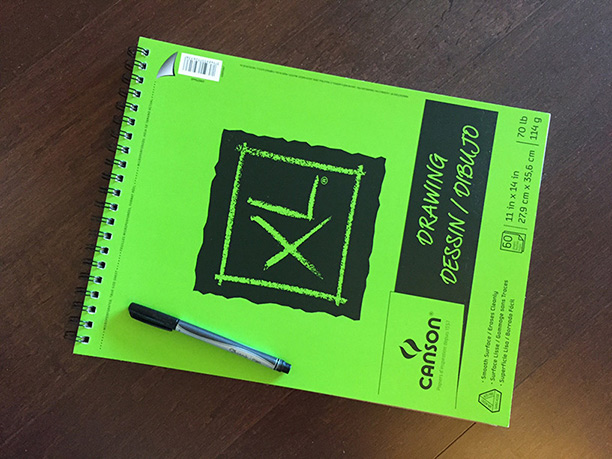
Coding question practice is not about memorizing answers to programming problems.
[⬆ back to top](#table-of-contents)
Coding Problems
Don't forget your key coding interview books here.
Solving Problems:
Coding Interview Question Videos:
- IDeserve (88 videos)
- Tushar Roy (5 playlists)
- Super for walkthroughs of problem solutions
- Nick White - LeetCode Solutions (187 Videos)
- Good explanations of the solution and the code
- You can watch several in a short time
- FisherCoder - LeetCode Solutions
Challenge/Practice sites:
- LeetCode
- My favorite coding problem site. It's worth the subscription money for the 1-2 months you'll likely be preparing.
- See Nick White and FisherCoder Videos above for code walk-throughs.
- HackerRank
- TopCoder
- Codeforces
- Codility
- Geeks for Geeks
- AlgoExpert
- Created by Google engineers, this is also an excellent resource to hone your skills.
- Project Euler
- very math-focused, and not really suited for coding interviews
[⬆ back to top](#table-of-contents)
Let's Get Started
Alright, enough talk, let's learn!
But don't forget to do coding problems from above while you learn!
Algorithmic complexity / Big-O / Asymptotic analysis
- Nothing to implement here, you're just watching videos and taking notes! Yay!
- There are a lot of videos here. Just watch enough until you understand it. You can always come back and review.
- Don't worry if you don't understand all the math behind it.
- You just need to understand how to express the complexity of an algorithm in terms of Big-O.
- [ ] Harvard CS50 - Asymptotic Notation (video)
- [ ] Big O Notations (general quick tutorial) (video)
- [ ] Big O Notation (and Omega and Theta) - best mathematical explanation (video)
- [ ] Skiena (video)
- [ ] UC Berkeley Big O (video)
- [ ] Amortized Analysis (video)
- [ ] TopCoder (includes recurrence relations and master theorem):
- Computational Complexity: Section 1
- Computational Complexity: Section 2
- [ ] Cheat sheet
- [ ] [[Review] Analyzing Algorithms (playlist) in 18 minutes (video)](https://www.youtube.com/playlist?list=PL9xmBV_5YoZMxejjIyFHWa-4nKg6sdoIv)
Well, that's about enough of that.
When you go through "Cracking the Coding Interview", there is a chapter on this, and at the end there is a quiz to see if you can identify the runtime complexity of different algorithms. It's a super review and test.
[⬆ back to top](#table-of-contents)
Data Structures
- ### Arrays
- [ ] About Arrays:
- Arrays CS50 Harvard University
- Arrays (video)
- UC Berkeley CS61B - Linear and Multi-Dim Arrays (video) (Start watching from 15m 32s)
- Dynamic Arrays (video)
- Jagged Arrays (video)
- [ ] Implement a vector (mutable array with automatic resizing):
- [ ] Practice coding using arrays and pointers, and pointer math to jump to an index instead of using indexing.
- [ ] New raw data array with allocated memory
- can allocate int array under the hood, just not use its features
- start with 16, or if the starting number is greater, use power of 2 - 16, 32, 64, 128
- [ ] size() - number of items
- [ ] capacity() - number of items it can hold
- [ ] is_empty()
- [ ] at(index) - returns the item at a given index, blows up if index out of bounds
- [ ] push(item)
- [ ] insert(index, item) - inserts item at index, shifts that index's value and trailing elements to the right
- [ ] prepend(item) - can use insert above at index 0
- [ ] pop() - remove from end, return value
- [ ] delete(index) - delete item at index, shifting all trailing elements left
- [ ] remove(item) - looks for value and removes index holding it (even if in multiple places)
- [ ] find(item) - looks for value and returns first index with that value, -1 if not found
- [ ] resize(new_capacity) // private function
- when you reach capacity, resize to double the size
- when popping an item, if the size is 1/4 of capacity, resize to half
- [ ] Time
- O(1) to add/remove at end (amortized for allocations for more space), index, or update
- O(n) to insert/remove elsewhere
- [ ] Space
- contiguous in memory, so proximity helps performance
- space needed = (array capacity, which is >= n) * size of item, but even if 2n, still O(n)
- ### Linked Lists
- [ ] Description:
- [ ] Linked Lists CS50 Harvard University - this builds the intuition.
- [ ] Singly Linked Lists (video)
- [ ] CS 61B - Linked Lists 1 (video)
- [ ] CS 61B - Linked Lists 2 (video)
- [ ] [[Review] Linked lists in 4 minutes (video)](https://youtu.be/F8AbOfQwl1c)
- [ ] C Code (video)
- not the whole video, just portions about Node struct and memory allocation
- [ ] Linked List vs Arrays:
- Core Linked Lists Vs Arrays (video)
- In The Real World Linked Lists Vs Arrays (video)
- [ ] Why you should avoid linked lists (video)
- [ ] Gotcha: you need pointer to pointer knowledge:
(for when you pass a pointer to a function that may change the address where that pointer points) This page is just to get a grasp on ptr to ptr. I don't recommend this list traversal style. Readability and maintainability suffer due to cleverness.
- Pointers to Pointers
- [ ] Implement (I did with tail pointer & without):
- [ ] size() - returns the number of data elements in the list
- [ ] empty() - bool returns true if empty
- [ ] value_at(index) - returns the value of the nth item (starting at 0 for first)
- [ ] push_front(value) - adds an item to the front of the list
- [ ] pop_front() - remove the front item and return its value
- [ ] push_back(value) - adds an item at the end
- [ ] pop_back() - removes end item and returns its value
- [ ] front() - get the value of the front item
- [ ] back() - get the value of the end item
- [ ] insert(index, value) - insert value at index, so the current item at that index is pointed to by the new item at the index
- [ ] erase(index) - removes node at given index
- [ ] value_n_from_end(n) - returns the value of the node at the nth position from the end of the list
- [ ] reverse() - reverses the list
- [ ] remove_value(value) - removes the first item in the list with this value
- [ ] Doubly-linked List
- Description (video)
- No need to implement
- ### Stack
- [ ] Stacks (video)
- [ ] [[Review] Stacks in 3 minutes (video)](https://youtu.be/KcT3aVgrrpU)
- [ ] Will not implement. Implementing with the array is trivial
- ### Queue
- [ ] Queue (video)
- [ ] Circular buffer/FIFO
- [ ] [[Review] Queues in 3 minutes (video)](https://youtu.be/D6gu-_tmEpQ)
- [ ] Implement using linked-list, with tail pointer:
- enqueue(value) - adds value at a position at the tail
- dequeue() - returns value and removes least recently added element (front)
- empty()
- [ ] Implement using a fixed-sized array:
- enqueue(value) - adds item at end of available storage
- dequeue() - returns value and removes least recently added element
- empty()
- full()
- [ ] Cost:
- a bad implementation using a linked list where you enqueue at the head and dequeue at the tail would be O(n)
because you'd need the next to last element, causing a full traversal of each dequeue
- enqueue: O(1) (amortized, linked list and array [probing])
- dequeue: O(1) (linked list and array)
- empty: O(1) (linked list and array)
- ### Hash table
- [ ] Videos:
- [ ] Hashing with Chaining (video)
- [ ] Table Doubling, Karp-Rabin (video)
- [ ] Open Addressing, Cryptographic Hashing (video)
- [ ] PyCon 2010: The Mighty Dictionary (video)
- [ ] PyCon 2017: The Dictionary Even Mightier (video)
- [ ] (Advanced) Randomization: Universal & Perfect Hashing (video)
- [ ] (Advanced) Perfect hashing (video)
- [ ] [[Review] Hash tables in 4 minutes (video)](https://youtu.be/knV86FlSXJ8)
- [ ] Online Courses:
- [ ] Core Hash Tables (video)
- [ ] Data Structures (video)
- [ ] Phone Book Problem (video)
- [ ] distributed hash tables:
- Instant Uploads And Storage Optimization In Dropbox (video)
- Distributed Hash Tables (video)
- [ ] Implement with array using linear probing
- hash(k, m) - m is the size of the hash table
- add(key, value) - if the key already exists, update value
- exists(key)
- get(key)
- remove(key)
[⬆ back to top](#table-of-contents)
More Knowledge
- ### Binary search
- [ ] Binary Search (video)
- [ ] Binary Search (video)
- [ ] detail
- [ ] blueprint
- [ ] [[Review] Binary search in 4 minutes (video)](https://youtu.be/fDKIpRe8GW4)
- [ ] Implement:
- binary search (on a sorted array of integers)
- binary search using recursion
- ### Bitwise operations
- [ ] Bits cheat sheet
- you should know many of the powers of 2 from (2^1 to 2^16 and 2^32)
- [ ] Get a really good understanding of manipulating bits with: &, |, ^, ~, >>, <<
- [ ] words)
- [ ] Good intro:
- [ ] C Programming Tutorial 2-10: Bitwise Operators (video)
- [ ] Bit Manipulation
- [ ] Bitwise Operation
- [ ] Bithacks
- [ ] The Bit Twiddler
- [ ] The Bit Twiddler Interactive
- [ ] Bit Hacks (video)
- [ ] Practice Operations
- [ ] 2s and 1s complement
- Binary: Plusses & Minuses (Why We Use Two's Complement) (video)
- 1s Complement
- 2s Complement
- [ ] Count set bits
- 4 ways to count bits in a byte (video)
- Count Bits
- How To Count The Number Of Set Bits In a 32 Bit Integer
- [ ] Swap values:
- Swap
- [ ] Absolute value:
- Absolute Integer
[⬆ back to top](#table-of-contents)
Trees
- ### Trees - Intro
- [ ] Intro to Trees (video)
- [ ] Tree Traversal (video)
- [ ] BFS(breadth-first search) and DFS(depth-first search) (video)
- BFS notes:
- level order (BFS, using queue)
- time complexity: O(n)
- space complexity: best: O(1), worst: O(n/2)=O(n)
- DFS notes:
- time complexity: O(n)
- space complexity:
best: O(log n) - avg. height of tree worst: O(n)
- inorder (DFS: left, self, right)
- postorder (DFS: left, right, self)
- preorder (DFS: self, left, right)
- [ ] [[Review] Breadth-first search in 4 minutes (video)](https://youtu.be/HZ5YTanv5QE)
- [ ] [[Review] Depth-first search in 4 minutes (video)](https://youtu.be/Urx87-NMm6c)
- [ ] [[Review] Tree Traversal (playlist) in 11 minutes (video)](https://www.youtube.com/playlist?list=PL9xmBV_5YoZO1JC2RgEi04nLy6D-rKk6b)
- ### Binary search trees: BSTs
- [ ] Binary Search Tree Review (video)
- [ ] Introduction (video)
- [ ] MIT (video)
- C/C++:
- [ ] Binary search tree - Implementation in C/C++ (video)
- [ ] BST implementation - memory allocation in stack and heap (video)
- [ ] Find min and max element in a binary search tree (video)
- [ ] Find the height of a binary tree (video)
- [ ] Binary tree traversal - breadth-first and depth-first strategies (video)
- [ ] Binary tree: Level Order Traversal (video)
- [ ] Binary tree traversal: Preorder, Inorder, Postorder (video)
- [ ] Check if a binary tree is a binary search tree or not (video)
- [ ] Delete a node from Binary Search Tree (video)
- [ ] Inorder Successor in a binary search tree (video)
- [ ] Implement:
- [ ] insert // insert value into tree
- [ ] get_node_count // get count of values stored
- [ ] print_values // prints the values in the tree, from min to max
- [ ] delete_tree
- [ ] is_in_tree // returns true if a given value exists in the tree
- [ ] get_height // returns the height in nodes (single node's height is 1)
- [ ] get_min // returns the minimum value stored in the tree
- [ ] get_max // returns the maximum value stored in the tree
- [ ] is_binary_search_tree
- [ ] delete_value
- [ ] get_successor // returns the next-highest value in the tree after given value, -1 if none
- ### Heap / Priority Queue / Binary Heap
- visualized as a tree, but is usually linear in storage (array, linked list)
- [ ] Heap)
- [ ] Introduction (video)
- [ ] Binary Trees (video)
- [ ] Tree Height Remark (video)
- [ ] Basic Operations (video)
- [ ] Complete Binary Trees (video)
- [ ] Pseudocode (video)
- [ ] Heap Sort - jumps to start (video)
- [ ] Heap Sort (video)
- [ ] Building a heap (video)
- [ ] MIT 6.006 Introduction to Algorithms: Binary Heaps
- [ ] CS 61B Lecture 24: Priority Queues (video)
- [ ] Linear Time BuildHeap (max-heap)
- [ ] [[Review] Heap (playlist) in 13 minutes (video)](https://www.youtube.com/playlist?list=PL9xmBV_5YoZNsyqgPW-DNwUeT8F8uhWc6)
- [ ] Implement a max-heap:
- [ ] insert
- [ ] sift_up - needed for insert
- [ ] get_max - returns the max item, without removing it
- [ ] get_size() - return number of elements stored
- [ ] is_empty() - returns true if the heap contains no elements
- [ ] extract_max - returns the max item, removing it
- [ ] sift_down - needed for extract_max
- [ ] remove(x) - removes item at index x
- [ ] heapify - create a heap from an array of elements, needed for heap_sort
- [ ] heap_sort() - take an unsorted array and turn it into a sorted array in place using a max heap or min heap
[⬆ back to top](#table-of-contents)
Sorting
- [ ] Notes:
- Implement sorts & know best case/worst case, average complexity of each:
- no bubble sort - it's terrible - O(n^2), except when n <= 16
- [ ] Stability in sorting algorithms ("Is Quicksort stable?")
- Sorting Algorithm Stability
- Stability In Sorting Algorithms
- Stability In Sorting Algorithms
- Sorting Algorithms - Stability
- [ ] Which algorithms can be used on linked lists? Which on arrays? Which of both?
- I wouldn't recommend sorting a linked list, but merge sort is doable.
- Merge Sort For Linked List
- For heapsort, see the Heap data structure above. Heap sort is great, but not stable
- [ ] Sedgewick - Mergesort (5 videos)
- [ ] 1. Mergesort
- [ ] 2. Bottom-up Mergesort
- [ ] 3. Sorting Complexity
- [ ] 4. Comparators
- [ ] 5. Stability
- [ ] Sedgewick - Quicksort (4 videos)
- [ ] 1. Quicksort
- [ ] 2. Selection
- [ ] 3. Duplicate Keys
- [ ] 4. System Sorts
- [ ] UC Berkeley:
- [ ] CS 61B Lecture 29: Sorting I (video)
- [ ] CS 61B Lecture 30: Sorting II (video)
- [ ] CS 61B Lecture 32: Sorting III (video)
- [ ] CS 61B Lecture 33: Sorting V (video)
- [ ] CS 61B 2014-04-21: Radix Sort(video)
- [ ] Bubble Sort (video)
- [ ] Analyzing Bubble Sort (video)
- [ ] Insertion Sort, Merge Sort (video)
- [ ] Insertion Sort (video)
- [ ] Merge Sort (video)
- [ ] Quicksort (video)
- [ ] Selection Sort (video)
- [ ] Merge sort code:
- [ ] Using output array (C)
- [ ] Using output array (Python)
- [ ] In-place (C++)
- [ ] Quick sort code:
- [ ] Implementation (C)
- [ ] Implementation (C)
- [ ] Implementation (Python)
- [ ] [[Review] Sorting (playlist) in 18 minutes](https://www.youtube.com/playlist?list=PL9xmBV_5YoZOZSbGAXAPIq1BeUf4j20pl)
- [ ] Quick sort in 4 minutes (video)
- [ ] Heap sort in 4 minutes (video)
- [ ] Merge sort in 3 minutes (video)
- [ ] Bubble sort in 2 minutes (video)
- [ ] Selection sort in 3 minutes (video)
- [ ] Insertion sort in 2 minutes (video)
- [ ] Implement:
- [ ] Mergesort: O(n log n) average and worst case
- [ ] Quicksort O(n log n) average case
- Selection sort and insertion sort are both O(n^2) average and worst-case
- For heapsort, see Heap data structure above
- [ ] Not required, but I recommended them:
- [ ] Sedgewick - Radix Sorts (6 videos)
- [ ] 1. Strings in Java
- [ ] 2. Key Indexed Counting
- [ ] 3. Least Significant Digit First String Radix Sort
- [ ] 4. Most Significant Digit First String Radix Sort
- [ ] 5. 3 Way Radix Quicksort
- [ ] 6. Suffix Arrays
- [ ] Radix Sort
- [ ] Radix Sort (video)
- [ ] Radix Sort, Counting Sort (linear time given constraints) (video)
- [ ] Randomization: Matrix Multiply, Quicksort, Freivalds' algorithm (video)
- [ ] Sorting in Linear Time (video)
As a summary, here is a visual representation of 15 sorting algorithms. If you need more detail on this subject, see the "Sorting" section in Additional Detail on Some Subjects
[⬆ back to top](#table-of-contents)
Graphs
Graphs can be used to represent many problems in computer science, so this section is long, like trees and sorting.
- Notes:
- There are 4 basic ways to represent a graph in memory:
- objects and pointers
- adjacency matrix
- adjacency list
- adjacency map
- Familiarize yourself with each representation and its pros & cons
- BFS and DFS - know their computational complexity, their trade-offs, and how to implement them in real code
- When asked a question, look for a graph-based solution first, then move on if none
- [ ] MIT(videos):
- [ ] Breadth-First Search
- [ ] Depth-First Search
- [ ] Skiena Lectures - great intro:
- [ ] CSE373 2020 - Lecture 10 - Graph Data Structures (video)
- [ ] CSE373 2020 - Lecture 11 - Graph Traversal (video)
- [ ] CSE373 2020 - Lecture 12 - Depth First Search (video)
- [ ] CSE373 2020 - Lecture 13 - Minimum Spanning Trees (video)
- [ ] CSE373 2020 - Lecture 14 - Minimum Spanning Trees (con't) (video)
- [ ] CSE373 2020 - Lecture 15 - Graph Algorithms (con't 2) (video)
- [ ] Graphs (review and more):
- [ ] 6.006 Single-Source Shortest Paths Problem (video)
- [ ] 6.006 Dijkstra (video)
- [ ] 6.006 Bellman-Ford (video)
- [ ] 6.006 Speeding Up Dijkstra (video)
- [ ] Aduni: Graph Algorithms I - Topological Sorting, Minimum Spanning Trees, Prim's Algorithm - Lecture 6 (video)
- [ ] Aduni: Graph Algorithms II - DFS, BFS, Kruskal's Algorithm, Union Find Data Structure - Lecture 7 (video)
- [ ] Aduni: Graph Algorithms III: Shortest Path - Lecture 8 (video)
- [ ] Aduni: Graph Alg. IV: Intro to geometric algorithms - Lecture 9 (video)
- [ ] CS 61B 2014: Weighted graphs (video)
- [ ] Greedy Algorithms: Minimum Spanning Tree (video)
- [ ] Strongly Connected Components Kosaraju's Algorithm Graph Algorithm (video)
- [ ] [[Review] Shortest Path Algorithms (playlist) in 16 minutes (video)](https://www.youtube.com/playlist?list=PL9xmBV_5YoZO-Y-H3xIC9DGSfVYJng9Yw)
- [ ] [[Review] Minimum Spanning Trees (playlist) in 4 minutes (video)](https://www.youtube.com/playlist?list=PL9xmBV_5YoZObEi3Hf6lmyW-CBfs7nkOV)
- Full Coursera Course:
- [ ] Algorithms on Graphs (video)
- I'll implement:
- [ ] DFS with adjacency list (recursive)
- [ ] DFS with adjacency list (iterative with stack)
- [ ] DFS with adjacency matrix (recursive)
- [ ] DFS with adjacency matrix (iterative with stack)
- [ ] BFS with adjacency list
- [ ] BFS with adjacency matrix
- [ ] single-source shortest path (Dijkstra)
- [ ] minimum spanning tree
- DFS-based algorithms (see Aduni videos above):
- [ ] check for a cycle (needed for topological sort, since we'll check for the cycle before starting)
- [ ] topological sort
- [ ] count connected components in a graph
- [ ] list strongly connected components
- [ ] check for bipartite graph
[⬆ back to top](#table-of-contents)
Even More Knowledge
- ### Recursion
- [ ] Stanford lectures on recursion & backtracking:
- [ ] Lecture 8 | Programming Abstractions (video)
- [ ] Lecture 9 | Programming Abstractions (video)
- [ ] Lecture 10 | Programming Abstractions (video)
- [ ] Lecture 11 | Programming Abstractions (video)
- When it is appropriate to use it?
- How is tail recursion better than not?
- [ ] What Is Tail Recursion Why Is It So Bad?
- [ ] Tail Recursion (video)
- [ ] 5 Simple Steps for Solving Any Recursive Problem(video)
Backtracking Blueprint: Java) Python
- ### Dynamic Programming
- You probably won't see any dynamic programming problems in your interview, but it's worth being able to recognize a
problem as being a candidate for dynamic programming.
- This subject can be pretty difficult, as each DP soluble problem must be defined as a recursion relation, and coming up with it can be tricky.
- I suggest looking at many examples of DP problems until you have a solid understanding of the pattern involved.
- [ ] Videos:
- [ ] Skiena: CSE373 2020 - Lecture 19 - Introduction to Dynamic Programming (video)
- [ ] Skiena: CSE373 2020 - Lecture 20 - Edit Distance (video)
- [ ] Skiena: CSE373 2020 - Lecture 20 - Edit Distance (continued) (video)
- [ ] Skiena: CSE373 2020 - Lecture 21 - Dynamic Programming (video)
- [ ] Skiena: CSE373 2020 - Lecture 22 - Dynamic Programming and Review (video)
- [ ] Simonson: Dynamic Programming 0 (starts at 59:18) (video)
- [ ] Simonson: Dynamic Programming I - Lecture 11 (video)
- [ ] Simonson: Dynamic programming II - Lecture 12 (video)
- [ ] List of individual DP problems (each is short):
- [ ] Yale Lecture notes:
- [ ] Dynamic Programming
- [ ] Coursera:
- [ ] The RNA secondary structure problem (video)
- [ ] A dynamic programming algorithm (video)
- [ ] Illustrating the DP algorithm (video)
- [ ] Running time of the DP algorithm (video)
- [ ] DP vs. recursive implementation (video)
- [ ] Global pairwise sequence alignment (video)
- [ ] Local pairwise sequence alignment (video)
- ### Design patterns
- [ ] Quick UML review (video)
- [ ] Learn these patterns:
- [ ] strategy
- [ ] singleton
- [ ] adapter
- [ ] prototype
- [ ] decorator
- [ ] visitor
- [ ] factory, abstract factory
- [ ] facade
- [ ] observer
- [ ] proxy
- [ ] delegate
- [ ] command
- [ ] state
- [ ] memento
- [ ] iterator
- [ ] composite
- [ ] flyweight
- [ ] Series of videos (27 videos)
- [ ] Book: Head First Design Patterns
- I know the canonical book is "Design Patterns: Elements of Reusable Object-Oriented Software", but Head First is great for beginners to OO.
- Handy reference: 101 Design Patterns & Tips for Developers
- ### Combinatorics (n choose k) & Probability
- [ ] Math Skills: How to find Factorial, Permutation, and Combination (Choose) (video)
- [ ] Make School: Probability (video)
- [ ] Make School: More Probability and Markov Chains (video)
- [ ] Khan Academy:
- Course layout:
- [ ] Basic Theoretical Probability
- Just the videos - 41 (each are simple and each are short):
- [ ] Probability Explained (video)
- ### NP, NP-Complete and Approximation Algorithms
- Know about the most famous classes of NP-complete problems, such as the traveling salesman and the knapsack problem,
and be able to recognize them when an interviewer asks you them in disguise.
- Know what NP-complete means.
- [ ] Computational Complexity (video)
- [ ] Simonson:
- [ ] Greedy Algs. II & Intro to NP-Completeness (video)
- [ ] NP Completeness II & Reductions (video)
- [ ] NP Completeness III (Video)
- [ ] NP Completeness IV (video)
- [ ] Skiena:
- [ ] CSE373 2020 - Lecture 23 - NP-Completeness (video)
- [ ] CSE373 2020 - Lecture 24 - Satisfiability (video)
- [ ] CSE373 2020 - Lecture 25 - More NP-Completeness (video)
- [ ] CSE373 2020 - Lecture 26 - NP-Completeness Challenge (video)
- [ ] Complexity: P, NP, NP-completeness, Reductions (video)
- [ ] Complexity: Approximation Algorithms (video)
- [ ] Complexity: Fixed-Parameter Algorithms (video)
- Peter Norvig discusses near-optimal solutions to the traveling salesman problem:
- Jupyter Notebook
- Pages 1048 - 1140 in CLRS if you have it.
- ### How computers process a program
- [ ] How CPU executes a program (video)
- [ ] How computers calculate - ALU (video)
- [ ] Registers and RAM (video)
- [ ] The Central Processing Unit (CPU) (video)
- [ ] Instructions and Programs (video)
- ### Caches
- [ ] LRU cache:
- [ ] The Magic of LRU Cache (100 Days of Google Dev) (video)
- [ ] Implementing LRU (video)
- [ ] LeetCode - 146 LRU Cache (C++) (video)
- [ ] CPU cache:
- [ ] MIT 6.004 L15: The Memory Hierarchy (video)
- [ ] MIT 6.004 L16: Cache Issues (video)
- ### Processes and Threads
- [ ] Computer Science 162 - Operating Systems (25 videos):
- for processes and threads see videos 1-11
- Operating Systems and System Programming (video)
- What Is The Difference Between A Process And A Thread?
- Covers:
- Processes, Threads, Concurrency issues
- Difference between processes and threads
- Processes
- Threads
- Locks
- Mutexes
- Semaphores
- Monitors
- How do they work?
- Deadlock
- Livelock
- CPU activity, interrupts, context switching
- Modern concurrency constructs with multicore processors
- Paging, segmentation, and virtual memory (video)
- Interrupts (video)
- Process resource needs (memory: code, static storage, stack, heap, and also file descriptors, i/o)
- Thread resource needs (shares above (minus stack) with other threads in the same process but each has its own PC, stack counter, registers, and stack)
- Forking is really copy on write (read-only) until the new process writes to memory, then it does a full copy.
- Context switching
- How context switching is initiated by the operating system and underlying hardware?
- [ ] threads in C++ (series - 10 videos)
- [ ] CS 377 Spring '14: Operating Systems from University of Massachusetts
- [ ] concurrency in Python (videos):
- [ ] Short series on threads
- [ ] Python Threads
- [ ] Understanding the Python GIL (2010)
- reference
- [ ] David Beazley - Python Concurrency From the Ground Up LIVE! - PyCon 2015
- [ ] Keynote David Beazley - Topics of Interest (Python Asyncio)
- [ ] Mutex in Python
- ### Testing
- To cover:
- how unit testing works
- what are mock objects
- what is integration testing
- what is dependency injection
- [ ] Agile Software Testing with James Bach (video)
- [ ] Open Lecture by James Bach on Software Testing (video)
- [ ] Steve Freeman - Test-Driven Development (that’s not what we meant) (video)
- slides
- [ ] Dependency injection:
- [ ] video
- [ ] Tao Of Testing
- [ ] How to write tests
- ### String searching & manipulations
- [ ] Sedgewick - Suffix Arrays (video)
- [ ] Sedgewick - Substring Search (videos)
- [ ] 1. Introduction to Substring Search
- [ ] 2. Brute-Force Substring Search
- [ ] 3. Knuth-Morris Pratt
- [ ] 4. Boyer-Moore
- [ ] 5. Rabin-Karp
- [ ] Search pattern in a text (video)
If you need more detail on this subject, see the "String Matching" section in Additional Detail on Some Subjects.
- ### Tries
- Note there are different kinds of tries. Some have prefixes, some don't, and some use strings instead of bits
to track the path
- I read through the code, but will not implement
- [ ] Sedgewick - Tries (3 videos)
- [ ] 1. R Way Tries
- [ ] 2. Ternary Search Tries
- [ ] 3. Character Based Operations
- [ ] Notes on Data Structures and Programming Techniques
- [ ] Short course videos:
- [ ] Introduction To Tries (video)
- [ ] Performance Of Tries (video)
- [ ] Implementing A Trie (video)
- [ ] The Trie: A Neglected Data Structure
- [ ] TopCoder - Using Tries
- [ ] Stanford Lecture (real-world use case) (video)
- [ ] MIT, Advanced Data Structures, Strings (can get pretty obscure about halfway through) (video)
- ### Floating Point Numbers
- [ ] simple 8-bit: Representation of Floating Point Numbers - 1 (video - there is an error in calculations - see video description)
- ### Unicode
- [ ] The Absolute Minimum Every Software Developer Absolutely, Positively Must Know About Unicode and Character Sets
- [ ] What Every Programmer Absolutely, Positively Needs To Know About Encodings And Character Sets To Work With Text
- ### Endianness
- [ ] Big And Little Endian
- [ ] Big Endian Vs Little Endian (video)
- [ ] Big And Little Endian Inside/Out (video)
- Very technical talk for kernel devs. Don't worry if most is over your head.
- The first half is enough.
- ### Networking
- If you have networking experience or want to be a reliability engineer or operations engineer, expect questions
- Otherwise, this is just good to know
- [ ] Khan Academy
- [ ] UDP and TCP: Comparison of Transport Protocols (video)
- [ ] TCP/IP and the OSI Model Explained! (video)
- [ ] Packet Transmission across the Internet. Networking & TCP/IP tutorial. (video)
- [ ] HTTP (video)
- [ ] SSL and HTTPS (video)
- [ ] SSL/TLS (video)
- [ ] HTTP 2.0 (video)
- [ ] Video Series (21 videos) (video)
- [ ] Subnetting Demystified - Part 5 CIDR Notation (video)
- [ ] Sockets:
- [ ] Java - Sockets - Introduction (video)
- [ ] Socket Programming (video)
---
[⬆ back to top](#table-of-contents)
Final Review
This section will have shorter videos that you can watch pretty quickly to review most of the important concepts. It's nice if you want a refresher often.
- [ ] Series of 2-3 minutes short subject videos (23 videos)
- Videos
- [ ] Series of 2-5 minutes short subject videos - Michael Sambol (48 videos):
- Videos
- Code Examples
- [ ] Sedgewick Videos - Algorithms I
- [ ] Sedgewick Videos - Algorithms II
---
[⬆ back to top](#table-of-contents)
Update Your Resume
- See Resume prep information in the books: "Cracking The Coding Interview" and "Programming Interviews Exposed"
- "This Is What A GOOD Resume Should Look Like" by Gayle McDowell (author of Cracking the Coding Interview),
- Note by the author: "This is for a US-focused resume. CVs for India and other countries have different expectations, although many of the points will be the same."
- "Step-by-step resume guide" by Tech Interview Handbook
- Detailed guide on how to set up your resume from scratch, write effective resume content, optimize it, and test your resume
[⬆ back to top](#table-of-contents)
Interview Process & General Interview Prep
- [ ] How to Pass the Engineering Interview in 2021
- [ ] Demystifying Tech Recruiting
- [ ] How to Get a Job at the Big 4:
- [ ] How to Get a Job at the Big 4 - Amazon, Facebook, Google & Microsoft (video)
- [ ] How to Get a Job at the Big 4.1 (Follow-up video)
- [ ] Cracking The Coding Interview Set 1:
- [ ] Gayle L McDowell - Cracking The Coding Interview (video)
- [ ] Cracking the Coding Interview with Author Gayle Laakmann McDowell (video)
- [ ] Cracking the Facebook Coding Interview:
- [ ] The Approach
- [ ] Problem Walkthrough
- Prep Courses:
- Python for Data Structures, Algorithms, and Interviews (paid course):
- A Python-centric interview prep course that covers data structures, algorithms, mock interviews, and much more.
- Intro to Data Structures and Algorithms using Python (Udacity free course):
- A free Python-centric data structures and algorithms course.
- Data Structures and Algorithms Nanodegree! (Udacity paid Nanodegree):
- Get hands-on practice with over 100 data structures and algorithm exercises and guidance from a dedicated mentor to help prepare you for interviews and on-the-job scenarios.
- Grokking the Behavioral Interview (Educative free course):
- Many times, it’s not your technical competency that holds you back from landing your dream job, it’s how you perform on the behavioral interview.
- AlgoMonster (paid course with free content):
- The crash course for LeetCode. Covers all the patterns condensed from thousands of questions.
Mock Interviews:
- Gainlo.co: Mock interviewers from big companies - I used this and it helped me relax for the phone screen and on-site interview
- Pramp: Mock interviews from/with peers - a peer-to-peer model to practice interviews
- interviewing.io: Practice mock interview with senior engineers - anonymous algorithmic/systems design interviews with senior engineers from FAANG anonymously
- Meetapro: Mock interviews with top FAANG interviewers - an Airbnb-style mock interview/coaching platform.
- Hello Interview: Mock Interviews with Expert Coaches and AI - interview directly with AI or with FAANG staff engineers and managers.
- Codemia: Practice system design problems with AI or community solutions and feedback - Practice system design problems via AI practice tool. Share your solution with the community to get human feedback as well.
[⬆ back to top](#table-of-contents)
Be thinking of for when the interview comes
Think of about 20 interview questions you'll get, along with the lines of the items below. Have at least one answer for each. Have a story, not just data, about something you accomplished.
- Why do you want this job?
- What's a tough problem you've solved?
- Biggest challenges faced?
- Best/worst designs seen?
- Ideas for improving an existing product
- How do you work best, as an individual and as part of a team?
- Which of your skills or experiences would be assets in the role and why?
- What did you most enjoy at [job x / project y]?
- What was the biggest challenge you faced at [job x / project y]?
- What was the hardest bug you faced at [job x / project y]?
- What did you learn at [job x / project y]?
- What would you have done better at [job x / project y]?
[⬆ back to top](#table-of-contents)
Have questions for the interviewer
Some of mine (I already may know the answers, but want their opinion or team perspective):
- How large is your team?
- What does your dev cycle look like? Do you do waterfall/sprints/agile?
- Are rushes to deadlines common? Or is there flexibility?
- How are decisions made in your team?
- How many meetings do you have per week?
- Do you feel your work environment helps you concentrate?
- What are you working on?
- What do you like about it?
- What is the work life like?
- How is the work/life balance?
[⬆ back to top](#table-of-contents)
Once You've Got The Job
Congratulations!
Keep learning.
You're never really done.
---
Everything below this point is optional. It is NOT needed for an entry-level interview. However, by studying these, you'll get greater exposure to more CS concepts and will be better prepared for any software engineering job. You'll be a much more well-rounded software engineer.
---
[⬆ back to top](#table-of-contents)
Additional Books
These are here so you can dive into a topic you find interesting.
- The Unix Programming Environment
- An oldie but a goodie
- The Linux Command Line: A Complete Introduction
- A modern option
- TCP/IP Illustrated Series
- Head First Design Patterns
- A gentle introduction to design patterns
- Design Patterns: Elements of Reusable Object-Oriented Software
- AKA the "Gang Of Four" book or GOF
- The canonical design patterns book
- Algorithm Design Manual (Skiena)
- As a review and problem-recognition
- The algorithm catalog portion is well beyond the scope of difficulty you'll get in an interview
- This book has 2 parts:
- Class textbook on data structures and algorithms
- Pros:
- Is a good review as any algorithms textbook would be
- Nice stories from his experiences solving problems in industry and academia
- Code examples in C
- Cons:
- Can be as dense or impenetrable as CLRS, and in some cases, CLRS may be a better alternative for some subjects
- Chapters 7, 8, and 9 can be painful to try to follow, as some items are not explained well or require more brain than I have
- Don't get me wrong: I like Skiena, his teaching style, and mannerisms, but I may not be Stony Brook material
- Algorithm catalog:
- This is the real reason you buy this book.
- This book is better as an algorithm reference, and not something you read cover to cover.
- Can rent it on Kindle
- Answers:
- Solutions)
- Errata
- Algorithm (Jeff Erickson)
- Write Great Code: Volume 1: Understanding the Machine
- The book was published in 2004, and is somewhat outdated, but it's a terrific resource for understanding a computer in brief
- The author invented HLA, so take mentions and examples in HLA with a grain of salt. Not widely used, but decent examples of what assembly looks like
- These chapters are worth the read to give you a nice foundation:
- Chapter 2 - Numeric Representation
- Chapter 3 - Binary Arithmetic and Bit Operations
- Chapter 4 - Floating-Point Representation
- Chapter 5 - Character Representation
- Chapter 6 - Memory Organization and Access
- Chapter 7 - Composite Data Types and Memory Objects
- Chapter 9 - CPU Architecture
- Chapter 10 - Instruction Set Architecture
- Chapter 11 - Memory Architecture and Organization
- Introduction to Algorithms
- Important: Reading this book will only have limited value. This book is a great review of algorithms and data structures, but won't teach you how to write good code. You have to be able to code a decent solution efficiently
- AKA CLR, sometimes CLRS, because Stein was late to the game
- Computer Architecture, Sixth Edition: A Quantitative Approach
- For a richer, more up-to-date (2017), but longer treatment
[⬆ back to top](#table-of-contents)
System Design, Scalability, Data Handling
You can expect system design questions if you have 4+ years of experience.
- Scalability and System Design are very large topics with many topics and resources, since
there is a lot to consider when designing a software/hardware system that can scale. Expect to spend quite a bit of time on this
- Considerations:
- Scalability
- Distill large data sets to single values
- Transform one data set to another
- Handling obscenely large amounts of data
- System design
- features sets
- interfaces
- class hierarchies
- designing a system under certain constraints
- simplicity and robustness
- tradeoffs
- performance analysis and optimization
- [ ] START HERE: The System Design Primer
- [ ] System Design from HiredInTech
- [ ] How Do I Prepare To Answer Design Questions In A Technical Interview?
- [ ] 8 steps guide to ace your system design interview
- [ ] Database Normalization - 1NF, 2NF, 3NF and 4NF (video)
- [ ] System Design Interview - There are a lot of resources in this one. Look through the articles and examples. I put some of them below
- [ ] How to ace a systems design interview
- [ ] Numbers Everyone Should Know
- [ ] How long does it take to make a context switch?
- [ ] Transactions Across Datacenters (video)
- [ ] A plain English introduction to CAP Theorem
- [ ] MIT 6.824: Distributed Systems, Spring 2020 (20 videos)
- [ ] Consensus Algorithms:
- [ ] Paxos - Paxos Agreement - Computerphile (video)
- [ ] Raft - An Introduction to the Raft Distributed Consensus Algorithm (video)
- [ ] Easy-to-read paper
- [ ] Infographic
- [ ] Consistent Hashing
- [ ] NoSQL Patterns
- [ ] Scalability:
- You don't need all of these. Just pick a few that interest you.
- [ ] Great overview (video)
- [ ] Short series:
- Clones
- Database
- Cache
- Asynchronism
- [ ] Scalable Web Architecture and Distributed Systems
- [ ] Fallacies of Distributed Computing Explained
- [ ] Jeff Dean - Building Software Systems At Google and Lessons Learned (video)
- [ ] Introduction to Architecting Systems for Scale
- [ ] Scaling mobile games to a global audience using App Engine and Cloud Datastore (video)
- [ ] How Google Does Planet-Scale Engineering for Planet-Scale Infra (video)
- [ ] The Importance of Algorithms
- [ ] Sharding
- [ ] Engineering for the Long Game - Astrid Atkinson Keynote(video)
- [ ] 7 Years Of YouTube Scalability Lessons In 30 Minutes
- video
- [ ] How PayPal Scaled To Billions Of Transactions Daily Using Just 8VMs
- [ ] How to Remove Duplicates in Large Datasets
- [ ] A look inside Etsy's scale and engineering culture with Jon Cowie (video)
- [ ] What Led Amazon to its Own Microservices Architecture
- [ ] To Compress Or Not To Compress, That Was Uber's Question
- [ ] When Should Approximate Query Processing Be Used?
- [ ] Google's Transition From Single Datacenter To Failover, To A Native Multihomed Architecture
- [ ] The Image Optimization Technology That Serves Millions Of Requests Per Day
- [ ] A Patreon Architecture Short
- [ ] Tinder: How Does One Of The Largest Recommendation Engines Decide Who You'll See Next?
- [ ] Design Of A Modern Cache
- [ ] Live Video Streaming At Facebook Scale
- [ ] A Beginner's Guide To Scaling To 11 Million+ Users On Amazon's AWS
- [ ] A 360 Degree View Of The Entire Netflix Stack
- [ ] Latency Is Everywhere And It Costs You Sales - How To Crush It
- [ ] What Powers Instagram: Hundreds of Instances, Dozens of Technologies
- [ ] Salesforce Architecture - How They Handle 1.3 Billion Transactions A Day
- [ ] ESPN's Architecture At Scale - Operating At 100,000 Duh Nuh Nuhs Per Second
- [ ] See "Messaging, Serialization, and Queueing Systems" way below for info on some of the technologies that can glue services together
- [ ] Twitter:
- O'Reilly MySQL CE 2011: Jeremy Cole, "Big and Small Data at @Twitter" (video)
- Timelines at Scale
- For even more, see the "Mining Massive Datasets" video series in the Video Series section
- [ ] Practicing the system design process: Here are some ideas to try working through on paper, each with some documentation on how it was handled in the real world:
- review: The System Design Primer
- System Design from HiredInTech
- cheat sheet
- flow:
- Understand the problem and scope:
- Define the use cases, with the interviewer's help
- Suggest additional features
- Remove items that the interviewer deems out of scope
- Assume high availability is required, add as a use case
- Think about constraints:
- Ask how many requests per month
- Ask how many requests per second (they may volunteer it or make you do the math)
- Estimate reads vs. writes percentage
- Keep the 80/20 rule in mind when estimating
- How much data is written per second
- Total storage required over 5 years
- How much data read per second
- Abstract design:
- Layers (service, data, caching)
- Infrastructure: load balancing, messaging
- Rough overview of any key algorithm that drives the service
- Consider bottlenecks and determine solutions
- Exercises:
- Design a random unique ID generation system
- Design a key-value database
- Design a picture sharing system
- Design a recommendation system
- Design a URL-shortener system: copied from above
- Design a cache system
[⬆ back to top](#table-of-contents)
Additional Learning
I added them to help you become a well-rounded software engineer and to be aware of certain technologies and algorithms, so you'll have a bigger toolbox.
- ### Compilers
- How a Compiler Works in ~1 minute (video)
- Harvard CS50 - Compilers (video)
- C++ (video)
- Understanding Compiler Optimization (C++) (video)
- ### Emacs and vi(m)
- Familiarize yourself with a UNIX-based code editor
- vi(m):
- Editing With Vim 01 - Installation, Setup, and The Modes (video)
- VIM Adventures
- set of 4 videos:
- The vi/vim editor - Lesson 1
- The vi/vim editor - Lesson 2
- The vi/vim editor - Lesson 3
- The vi/vim editor - Lesson 4
- Using Vi Instead of Emacs
- emacs:
- Basics Emacs Tutorial (video)
- set of 3 (videos):
- Emacs Tutorial (Beginners) -Part 1- File commands, cut/copy/paste, cursor commands
- Emacs Tutorial (Beginners) -Part 2- Buffer management, search, M-x grep and rgrep modes
- Emacs Tutorial (Beginners) -Part 3- Expressions, Statements, ~/.emacs file, and packages
- Evil Mode: Or, How I Learned to Stop Worrying and Love Emacs (video)
- Writing C Programs With Emacs
- The Absolute Beginner's Guide to Emacs (video by David Wilson)
- The Absolute Beginner's Guide to Emacs (notes by David Wilson)
- ### Unix/Linux command line tools
- I filled in the list below from good tools.
- bash
- cat
- grep
- sed
- awk
- curl or wget
- sort
- tr
- uniq
- strace
- tcpdump
- Essential Linux Commands Tutorial
- ### DevOps
- DevOps Roadmap
- ### Information theory (videos)
- Khan Academy
- More about Markov processes:
- Core Markov Text Generation
- Core Implementing Markov Text Generation
- Project = Markov Text Generation Walk Through
- See more in the MIT 6.050J Information and Entropy series below
- ### Parity & Hamming Code (videos)
- Intro
- Parity
- Hamming Code:
- Error detection
- Error correction
- Error Checking
- ### Entropy
- Also see the videos below
- Make sure to watch information theory videos first
- Information Theory, Claude Shannon, Entropy, Redundancy, Data Compression & Bits (video)
- ### Cryptography
- Also see the videos below
- Make sure to watch information theory videos first
- Khan Academy Series
- Cryptography: Hash Functions
- Cryptography: Encryption
- ### Compression
- Make sure to watch information theory videos first
- Computerphile (videos):
- Compression
- Entropy in Compression
- Upside Down Trees (Huffman Trees)
- EXTRA BITS/TRITS - Huffman Trees
- Elegant Compression in Text (The LZ 77 Method)
- Text Compression Meets Probabilities
- Compressor Head videos
- (optional) Google Developers Live: GZIP is not enough!
- ### Computer Security
- MIT (23 videos)
- Introduction, Threat Models
- Control Hijacking Attacks
- Buffer Overflow Exploits and Defenses
- Privilege Separation
- Capabilities
- Sandboxing Native Code
- Web Security Model
- Securing Web Applications
- Symbolic Execution
- Network Security
- Network Protocols
- Side-Channel Attacks
- ### Garbage collection
- GC in Python (video)
- Deep Dive Java: Garbage Collection is Good!
- Deep Dive Python: Garbage Collection in CPython (video)
- ### Parallel Programming
- Coursera (Scala)
- Efficient Python for High-Performance Parallel Computing (video)
- ### Messaging, Serialization, and Queueing Systems
- Thrift
- Tutorial
- Protocol Buffers
- Tutorials
- gRPC
- gRPC 101 for Java Developers (video)
- Redis
- Tutorial
- Amazon SQS (queue)
- Amazon SNS (pub-sub)
- RabbitMQ
- Get Started
- Celery
- First Steps With Celery
- ZeroMQ
- Intro - Read The Manual
- ActiveMQ
- Kafka
- MessagePack
- Avro
- ### Fast Fourier Transform
- An Interactive Guide To The Fourier Transform
- What is a Fourier transform? What is it used for?
- What is the Fourier Transform? (video)
- Divide & Conquer: FFT (video)
- Understanding The FFT
- ### Bloom Filter
- Given a Bloom filter with m bits and k hashing functions, both insertion and membership testing are O(k)
- Bloom Filters (video)
- Bloom Filters | Mining of Massive Datasets | Stanford University (video)
- Tutorial
- How To Write A Bloom Filter App
- ### Locality-Sensitive Hashing
- Used to determine the similarity of documents
- The opposite of MD5 or SHA which are used to determine if 2 documents/strings are exactly the same
- Simhashing (hopefully) made simple
- ### van Emde Boas Trees
- Divide & Conquer: van Emde Boas Trees (video)
- MIT Lecture Notes
- ### Augmented Data Structures
- CS 61B Lecture 39: Augmenting Data Structures
- ### Balanced search trees
- Know at least one type of balanced binary tree (and know how it's implemented):
- "Among balanced search trees, AVL and 2/3 trees are now passé and red-black trees seem to be more popular.
A particularly interesting self-organizing data structure is the splay tree, which uses rotations to move any accessed key to the root." - Skiena
- Of these, I chose to implement a splay tree. From what I've read, you won't implement a
balanced search tree in your interview. But I wanted exposure to coding one up and let's face it, splay trees are the bee's knees. I did read a lot of red-black tree code
- Splay tree: insert, search, delete functions
If you end up implementing a red/black tree try just these:
- Search and insertion functions, skipping delete
- I want to learn more about B-Tree since it's used so widely with very large data sets
- Self-balancing binary search tree
- AVL trees
- In practice:
From what I can tell, these aren't used much in practice, but I could see where they would be: The AVL tree is another structure supporting O(log n) search, insertion, and removal. It is more rigidly balanced than red–black trees, leading to slower insertion and removal but faster retrieval. This makes it attractive for data structures that may be built once and loaded without reconstruction, such as language dictionaries (or program dictionaries, such as the opcodes of an assembler or interpreter)
- MIT AVL Trees / AVL Sort (video)
- AVL Trees (video)
- AVL Tree Implementation (video)
- Split And Merge
- [[Review] AVL Trees (playlist) in 19 minutes (video)](https://www.youtube.com/playlist?list=PL9xmBV_5YoZOUFgdIeOPuH6cfSnNRMau-)
- Splay trees
- In practice:
Splay trees are typically used in the implementation of caches, memory allocators, routers, garbage collectors, data compression, ropes (replacement of string used for long text strings), in Windows NT (in the virtual memory, networking and file system code) etc
- CS 61B: Splay Trees (video)
- MIT Lecture: Splay Trees:
- Gets very mathy, but watch the last 10 minutes for sure.
- Video
- Red/black trees
- These are a translation of a 2-3 tree (see below).
- In practice:
Red–black trees offer worst-case guarantees for insertion time, deletion time, and search time. Not only does this make them valuable in time-sensitive applications such as real-time applications, but it makes them valuable building blocks in other data structures that provide worst-case guarantees; for example, many data structures used in computational geometry can be based on red-black trees, and the Completely Fair Scheduler used in current Linux kernels uses red–black trees. In version 8 of Java, the Collection HashMap has been modified such that instead of using a LinkedList to store identical elements with poor hashcodes, a Red-Black tree is used
- Aduni - Algorithms - Lecture 4 (link jumps to the starting point) (video)
- Aduni - Algorithms - Lecture 5 (video)
- Red-Black Tree
- An Introduction To Binary Search And Red Black Tree
- [[Review] Red-Black Trees (playlist) in 30 minutes (video)](https://www.youtube.com/playlist?list=PL9xmBV_5YoZNqDI8qfOZgzbqahCUmUEin)
- 2-3 search trees
- In practice:
2-3 trees have faster inserts at the expense of slower searches (since height is more compared to AVL trees).
- You would use 2-3 trees very rarely because its implementation involves different types of nodes. Instead, people use Red-Black trees.
- 23-Tree Intuition and Definition (video)
- Binary View of 23-Tree
- 2-3 Trees (student recitation) (video)
- 2-3-4 Trees (aka 2-4 trees)
- In practice:
For every 2-4 trees, there are corresponding red–black trees with data elements in the same order. The insertion and deletion operations on 2-4 trees are also equivalent to color-flipping and rotations in red–black trees. This makes 2-4 trees an important tool for understanding the logic behind red-black trees, and this is why many introductory algorithm texts introduce 2-4 trees just before red–black trees, even though 2-4 trees are not often used in practice.
- CS 61B Lecture 26: Balanced Search Trees (video)
- Bottom Up 234-Trees (video)
- Top Down 234-Trees (video)
- N-ary (K-ary, M-ary) trees
- note: the N or K is the branching factor (max branches)
- binary trees are a 2-ary tree, with branching factor = 2
- 2-3 trees are 3-ary
- K-Ary Tree
- B-Trees
- Fun fact: it's a mystery, but the B could stand for Boeing, Balanced, or Bayer (co-inventor).
- In Practice:
B-trees are widely used in databases. Most modern filesystems use B-trees (or Variants). In addition to its use in databases, the B-tree is also used in filesystems to allow quick random access to an arbitrary block in a particular file. The basic problem is turning the file block address into a disk block (or perhaps to a cylinder head sector) address
- B-Tree
- B-Tree Datastructure
- Introduction to B-Trees (video)
- B-Tree Definition and Insertion (video)
- B-Tree Deletion (video)
- MIT 6.851 - Memory Hierarchy Models (video)
- covers cache-oblivious B-Trees, very interesting data structures
- the first 37 minutes are very technical, and may be skipped (B is block size, cache line size)
- [[Review] B-Trees (playlist) in 26 minutes (video)](https://www.youtube.com/playlist?list=PL9xmBV_5YoZNFPPv98DjTdD9X6UI9KMHz)
- ### k-D Trees
- Great for finding a number of points in a rectangle or higher-dimensional object
- A good fit for k-nearest neighbors
- kNN K-d tree algorithm (video)
- ### Skip lists
- "These are somewhat of a cult data structure" - Skiena
- Randomization: Skip Lists (video)
- For animations and a little more detail
- ### Network Flows
- Ford-Fulkerson in 5 minutes — Step by step example (video)
- Ford-Fulkerson Algorithm (video)
- Network Flows (video)
- ### Disjoint Sets & Union Find
- UCB 61B - Disjoint Sets; Sorting & selection (video)
- Sedgewick Algorithms - Union-Find (6 videos)
- ### Math for Fast Processing
- Integer Arithmetic, Karatsuba Multiplication (video)
- The Chinese Remainder Theorem (used in cryptography) (video)
- ### Treap
- Combination of a binary search tree and a heap
- Treap
- Data Structures: Treaps explained (video)
- Applications in set operations
- ### Linear Programming (videos)
- Linear Programming
- Finding minimum cost
- Finding maximum value
- Solve Linear Equations with Python - Simplex Algorithm
- ### Geometry, Convex hull (videos)
- Graph Alg. IV: Intro to geometric algorithms - Lecture 9
- Geometric Algorithms: Graham & Jarvis - Lecture 10
- Divide & Conquer: Convex Hull, Median Finding
- ### Discrete math
- Computer Science 70, 001 - Spring 2015 - Discrete Mathematics and Probability Theory
- Discrete Mathematics by Shai Simonson (19 videos)
- Discrete Mathematics By IIT Ropar NPTEL
---
[⬆ back to top](#table-of-contents)
Additional Detail on Some Subjects
I added these to reinforce some ideas already presented above, but didn't want to include them above because it's just too much. It's easy to overdo it on a subject. You want to get hired in this century, right?
- SOLID
- [ ] Bob Martin SOLID Principles of Object Oriented and Agile Design (video)
- [ ] S - Single Responsibility Principle | Single responsibility to each Object
- more flavor
- [ ] O - Open/Closed Principle | On production level Objects are ready for extension but not for modification
- more flavor
- [ ] L - Liskov Substitution Principle | Base Class and Derived class follow ‘IS A’ Principle
- more flavor
- [ ] I - Interface segregation principle | Clients should not be forced to implement interfaces they don't use
- Interface Segregation Principle in 5 minutes (video)
- more flavor
- [ ] D -Dependency Inversion principle | Reduce the dependency In composition of objects.
- Why Is The Dependency Inversion Principle And Why Is It Important
- more flavor
- More Dynamic Programming (videos)
- 6.006: Dynamic Programming I: Fibonacci, Shortest Paths
- 6.006: Dynamic Programming II: Text Justification, Blackjack
- 6.006: DP III: Parenthesization, Edit Distance, Knapsack
- 6.006: DP IV: Guitar Fingering, Tetris, Super Mario Bros.
- 6.046: Dynamic Programming & Advanced DP
- 6.046: Dynamic Programming: All-Pairs Shortest Paths
- 6.046: Dynamic Programming (student recitation)
- Advanced Graph Processing (videos)
- Synchronous Distributed Algorithms: Symmetry-Breaking. Shortest-Paths Spanning Trees
- Asynchronous Distributed Algorithms: Shortest-Paths Spanning Trees
- MIT Probability (mathy, and go slowly, which is good for mathy things) (videos):
- MIT 6.042J - Probability Introduction
- MIT 6.042J - Conditional Probability
- MIT 6.042J - Independence
- MIT 6.042J - Random Variables
- MIT 6.042J - Expectation I
- MIT 6.042J - Expectation II
- MIT 6.042J - Large Deviations
- MIT 6.042J - Random Walks
- String Matching
- Rabin-Karp (videos):
- Rabin Karps Algorithm
- Precomputing
- Optimization: Implementation and Analysis
- Table Doubling, Karp-Rabin
- Rolling Hashes, Amortized Analysis
- Knuth-Morris-Pratt (KMP):
- TThe Knuth-Morris-Pratt (KMP) String Matching Algorithm
- Boyer–Moore string search algorithm
- Boyer-Moore String Search Algorithm
- Advanced String Searching Boyer-Moore-Horspool Algorithms (video)
- Coursera: Algorithms on Strings
- starts off great, but by the time it gets past KMP it gets more complicated than it needs to be
- nice explanation of tries
- can be skipped
- Sorting
- Stanford lectures on sorting:
- Lecture 15 | Programming Abstractions (video)
- Lecture 16 | Programming Abstractions (video)
- Shai Simonson:
- Algorithms - Sorting - Lecture 2 (video)
- Algorithms - Sorting II - Lecture 3 (video)
- Steven Skiena lectures on sorting:
- CSE373 2020 - Mergesort/Quicksort (video)
- CSE373 2020 - Linear Sorting (video)
- NAND To Tetris: Build a Modern Computer from First Principles
[⬆ back to top](#table-of-contents)
Video Series
Sit back and enjoy.
[⬆ back to top](#table-of-contents)
Computer Science Courses
[⬆ back to top](#table-of-contents)
Algorithms implementation
[⬆ back to top](#table-of-contents)
Papers
- Love classic papers?
- 1978: Communicating Sequential Processes
- implemented in Go
- 2003: The Google File System
- replaced by Colossus in 2012
- 2004: MapReduce: Simplified Data Processing on Large Clusters
- mostly replaced by Cloud Dataflow?
- 2006: Bigtable: A Distributed Storage System for Structured Data
- 2006: The Chubby Lock Service for Loosely-Coupled Distributed Systems
- 2007: Dynamo: Amazon’s Highly Available Key-value Store
- The Dynamo paper kicked off the NoSQL revolution
- 2007: What Every Programmer Should Know About Memory (very long, and the author encourages skipping of some sections)
- 2012: AddressSanitizer: A Fast Address Sanity Checker:
- paper
- video
- 2013: Spanner: Google’s Globally-Distributed Database:
- paper
- video
- 2015: Continuous Pipelines at Google
- 2015: High-Availability at Massive Scale: Building Google’s Data Infrastructure for Ads
- 2015: How Developers Search for Code: A Case Study
- More papers: 1,000 papers
[⬆ back to top](#table-of-contents)
LICENSE
CC-BY-SA-4.0